Insights
No signal isn't a security plan: patching field laptops that can't stay connected
A field engineer's laptop comes back after three months at a remote site. It has missed three monthly rounds of Windows security updates, its malware definitions are months old, and within the hour it is back on the office network.
Nobody set out to skip anything. The site had no signal, the hotel Wi-Fi was slow and shared with every other guest, and the schedule never had room for an update window. Those reasons are real. None of them lowers the risk, and the gap between policy and practice is where the exposure sits.
The fix doesn't require a constant connection. Connect every laptop at least once a week so each monthly update lands within days, limit what an unpatched flaw can do between connections, treat hotel Wi-Fi as hostile, and keep the records that show it all happened.
If your laptops live in trucks and hotel rooms
This is for any organization whose people work where connectivity is scarce: engineering and utility contractors, inspection and survey crews, construction and field service teams, and technicians who live on the road.
The patch management guide from the National Institute of Standards and Technology (NIST) recognizes the problem. It lists network connectivity and bandwidth among the factors that shape how patches get deployed, and it uses mobile workforce laptops as one of its example maintenance groups (NIST SP 800-40 Rev. 4).
How a reasonable crew ends up months behind on patches
This is a composite of situations we have seen across clients, with details changed so no single company can be recognized.
A firm sends a two-person crew to a remote site for six weeks. The site has no cellular coverage, and the company doesn't pay for data plans. Evenings are spent at a motel whose Wi-Fi is slow, drops every few minutes and is shared with everyone else staying there. The laptops carry project files and the engineering software the crew uses on site.
Updates start downloading at the motel and stall. The laptop goes to sleep, and the install never finishes. Back at the office, nobody can say which laptops are current and which are months behind, because nobody is tracking it.
Everyone in that story is acting reasonably, and the laptops are still months behind.
Why patching alone can't protect a field laptop
Attackers get in through vulnerable software more than any other way. In Verizon's 2026 Data Breach Investigations Report, exploitation of vulnerabilities was the top initial access vector, at 31% of breaches, up from 20% the year before. Mandiant's M-Trends 2026 found the same pattern: exploits were the most common way in for the sixth year running, at 32% of intrusions. Mandiant also estimated the mean time to exploit at minus seven days, "meaning exploitation is routinely occurring before a patch is even released."
Mandiant's study of the vulnerabilities exploited in 2023 splits them into two groups, and each group calls for a different defense.
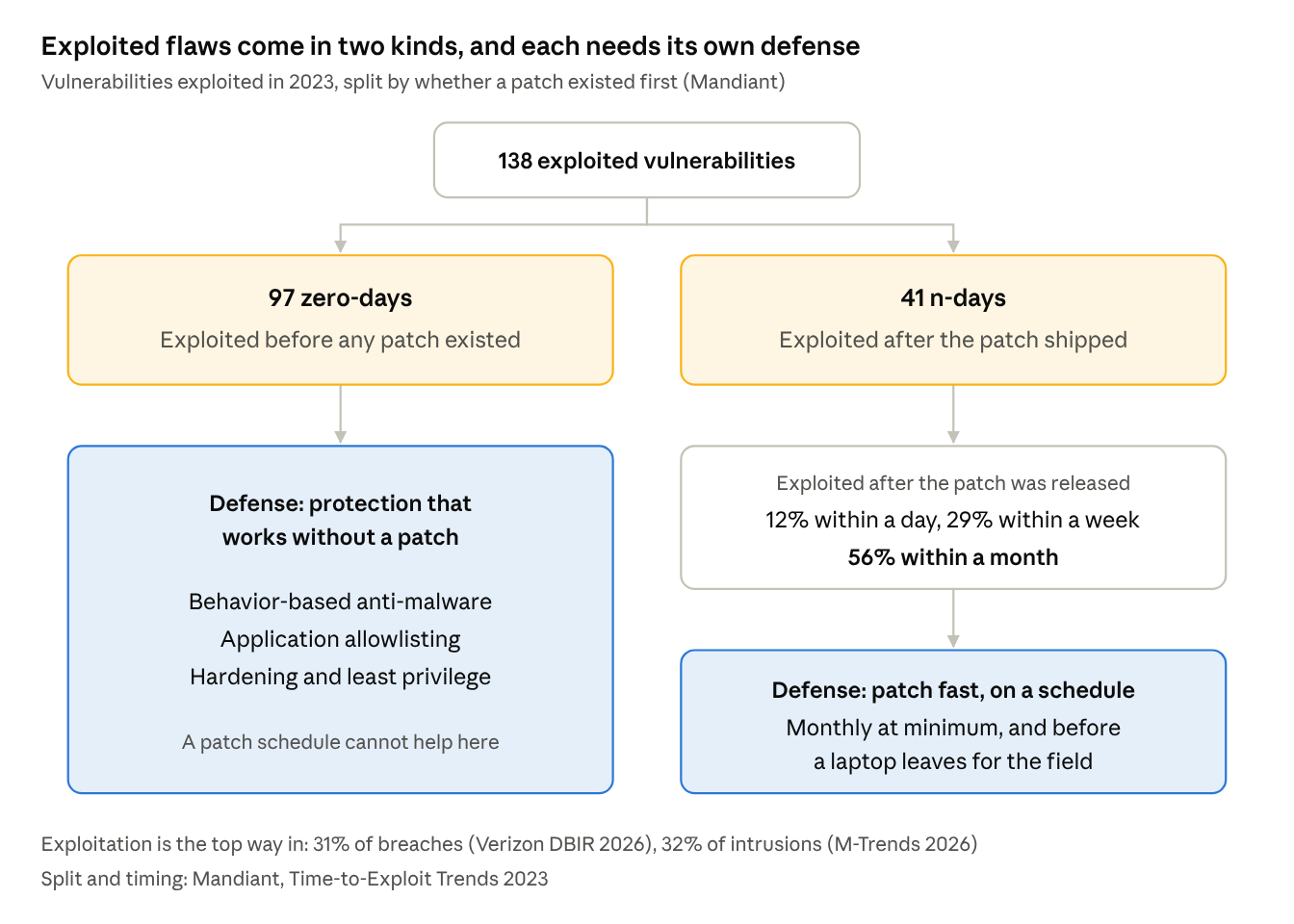
Of the 138 exploited vulnerabilities, 41 already had a patch. Attackers moved fast on those: 12% were exploited within a day of the patch, 29% within a week and 56% within a month. A laptop that misses a month of updates stays open through the window when most of those flaws were being exploited.
Connected organizations struggle with this too. In the same Verizon report, only 26% of the vulnerabilities on the Known Exploited Vulnerabilities list kept by the Cybersecurity and Infrastructure Security Agency (CISA) were fully remediated, and the median time to full remediation was 43 days.
The other 97 were zero-days, exploited before any patch existed. No update schedule helps until a fix ships, so those call for protection that works without a patch. Once the fix ships, patch speed matters again, which is why a field laptop needs both defenses.
What CIS, NIST, ISO and NERC expect, and where field laptops fall short
Every major framework expects patching and malware protection. The Center for Internet Security (CIS) Controls and the North American Electric Reliability Corporation's Critical Infrastructure Protection standards (NERC CIP) set a cadence, and the others leave the timing to your own risk decisions. Either way, the cadence is the part field teams run into.
| Framework | What it expects | How often |
|---|---|---|
| CIS Controls v8.1, Safeguards 7.3 and 7.4 | Automated patch management for operating systems and applications | Monthly or more often |
| CIS Controls v8.1, Safeguards 10.1 and 10.2 | Anti-malware on every asset, with automatic signature updates | Ongoing |
| NIST Cybersecurity Framework 2.0, PR.PS-02 | "Software is maintained, replaced, and removed commensurate with risk" | Based on your risk |
| NIST SP 800-40 Rev. 4 | Patching planned as routine preventive maintenance | Set by your maintenance plan |
| ISO/IEC 27001:2022, Annex A 8.8 | Management of technical vulnerabilities | Set by the organization |
| NERC CIP-007-6 R2, for comparison: utility BES Cyber Systems at high and medium impact | Evaluate security patches, then apply them or create a dated mitigation plan | Evaluate at least every 35 calendar days; act within 35 days of each evaluation |
All four CIS safeguards in the table belong to Implementation Group 1, which CIS defines as essential cyber hygiene and an emerging minimum standard of information security for all enterprises (CIS). A field laptop that goes months without patches or fresh definitions falls below that baseline, whatever the reason.
For contractors on the power grid, NERC CIP also sets rules for laptops that connect to utility equipment, and those rules can reach contractors through contracts. Our Not Air-Gap Tight series covers them.
The attacker doesn't care why you missed the patch
Field conditions explain why controls get skipped. They don't change what the controls were protecting against: a scanner looking for a known flaw finds it the same way whether the laptop missed the patch by choice or by circumstance.
The honest path is to document the gap and cover it. NIST SP 800-40 describes four ways to respond to a vulnerability: accept the risk, mitigate it, transfer it, or avoid it. Each one is a decision someone makes and records. A laptop that misses updates because it was offline reflects no decision at all.
Even NERC CIP, a set of mandatory reliability standards, offers documented paths instead of silent skipping. For high and medium impact BES Cyber Systems, CIP-007-6 gives an entity 35 days after each patch evaluation to apply the patch or create a dated mitigation plan.
NERC's Technical Feasibility Exception process is narrow. It applies only to requirements that expressly allow compliance where technically feasible, and the entity must still show compensating or mitigating measures that achieve at least a comparable level of security, which its Regional Entity reviews and approves.
The same logic works in any industry. A documented exception, with compensating controls, an owner and an expiry date, is a security decision. An undocumented one leaves the risk in place with no owner.
The real reasons updates don't reach field laptops
This often gets treated as an IT setting. In practice, five things keep field laptops from updating, and only one of them is technical.
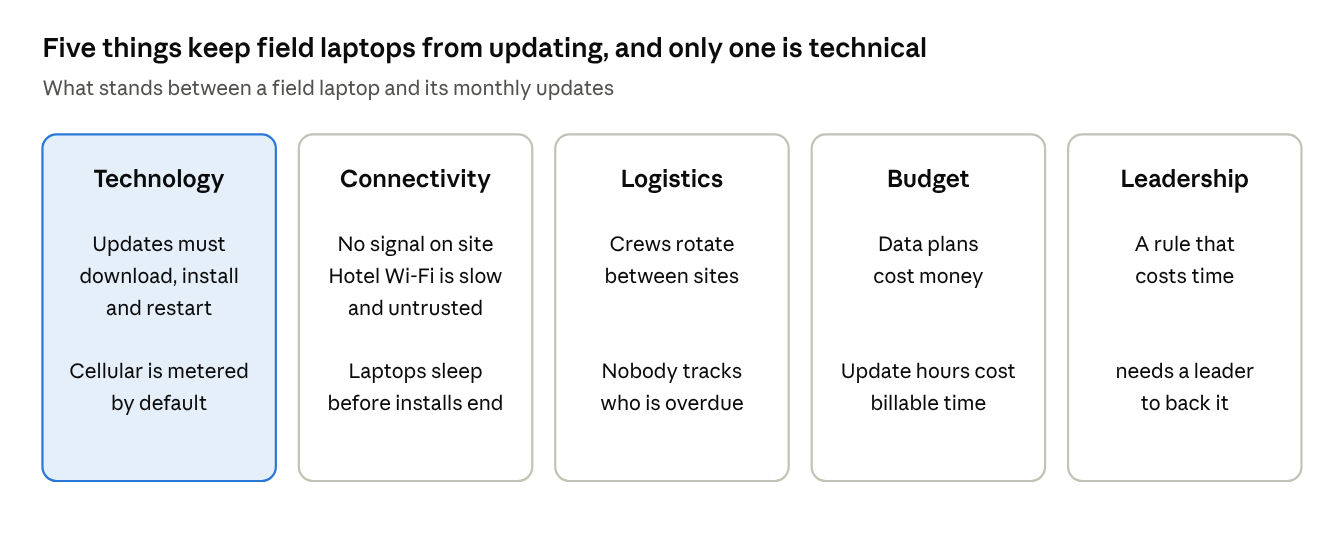
The technical piece is real. Updates have to download, install and restart before they count. Windows treats cellular connections as metered by default, and on a metered connection Windows Update limits itself to priority updates (Microsoft). If the company pays for data, check that policy allows updates over metered connections instead of assuming they download.
In our experience, the other four (connectivity, logistics, budget and leadership) are where programs usually fail, and fixing only the technology leaves them in place.
A weekly connection rhythm built around Patch Tuesday
Aim for every laptop to install each monthly security update within days of its release. Microsoft publishes its monthly security update, often called Patch Tuesday, on the second Tuesday of each month (Microsoft), so build the schedule around that date.
- A weekly connection to a trusted network, such as the office, the yard or a company hotspot, that lasts until updates finish installing and the laptop restarts. Hotel Wi-Fi doesn't count as trusted. Under Microsoft's compliance deadline settings, the deadline counts from when the laptop first scans and finds the update, and the grace period only starts once a restart is pending (Microsoft). An update that is installed but waiting on a restart isn't finished.
- A check before dispatch: updates installed, malware definitions current, disk encryption on (CIS Safeguard 3.6), no restart pending.
- A check on return, before the laptop rejoins the office network.
- One report showing days since the last successful update for every field laptop, reviewed weekly by a named person.
- An escalation rule: a laptop missing the current monthly update gets fixed before it goes back out.
Run the window in the evening on a company hotspot, when the laptop is charging anyway, and it costs far less billable time. If hotel Wi-Fi is the only connection, run the update through the company VPN rather than skip it.
For your IT team, in a Microsoft environment: set a quality update deadline and grace period (Update/ConfigureDeadlineForQualityUpdates and Update/ConfigureDeadlineGracePeriod), so a laptop that has been away installs and restarts within a set number of days of its first scan back.
For Defender, set a catch-up interval for security intelligence (the Group Policy setting that defines the number of days after which a catch-up update is required, or SignatureUpdateCatchupInterval in PowerShell), so a laptop that missed updates checks for the latest one the next time someone signs in (Microsoft).
Cover third-party applications in the same rhythm, such as browsers and PDF readers. CIS Safeguard 7.4 applies to applications as well as the operating system.
Zero-day defenses that work without a connection
What matters before a fix exists is how the laptop behaves on its own when something new shows up. These controls work locally, so they keep protecting the laptop between connections, and each one maps to a CIS Controls v8.1 safeguard:
- Behavior-based anti-malware (Safeguard 10.7) watches what software does instead of relying only on known signatures.
- Application allowlisting (Safeguard 2.5) lets only authorized software run, so unknown software is blocked even when nothing recognizes it as malware.
- A secure configuration process (Safeguard 4.1) strips out what the field work doesn't need, including autorun on removable media (Safeguard 10.3).
- Dedicated administrator accounts (Safeguard 5.4) keep everyday accounts out of admin rights, so malware that does start has far less to work with.
If your crews work for utilities, the NERC CIP reviews of vendor laptops already list application whitelisting (the standards' term for allowlisting) and system hardening among their options. That holds under CIP-003-9 for low impact systems and CIP-010-4 for medium and high impact systems.
These controls need upkeep too. Behavior engines and allowlists need updates, and features that depend on the vendor's cloud, such as cloud lookups and central alerting, wait until the laptop reconnects. Microsoft, for example, ships Defender's engine and platform updates monthly, on top of its security intelligence updates (Microsoft). Offline protection buys time between connections, and the laptop still has to reconnect.
Treat hotel Wi-Fi as hostile: safer ways to connect on a budget
For many crews, hotel Wi-Fi is the only connection at the end of the day, and slow is the smaller problem. The FBI warns that hotel networks are often built for guest convenience over strong security, and that attackers can run an evil twin: a malicious network with a name close to the hotel's (FBI). NSA's guidance for public settings says public Wi-Fi is often not configured securely and advises a corporate or personal hotspot with strong authentication and encryption whenever possible (NSA).
If hotel Wi-Fi is the only option, treat it as hostile:
- Confirm the network name with the front desk before connecting.
- Once past the hotel's login page, connect the company VPN before doing anything else. CIS Safeguard 12.7 calls for remote devices to authenticate to an enterprise-managed VPN before reaching company resources.
- Keep the host firewall on with a default-deny rule (CIS Safeguard 4.5).
- Save sensitive work for a trusted connection.
Most field programs mix two or three of these options:
| Option | Cost | Risk | Effort | Watch for |
|---|---|---|---|---|
| Weekly office or yard connection | Staff time | Low | Medium | Works only if crews pass through on a schedule |
| Cellular data plan, hotspot or built-in modem | Monthly data cost | Low with the company VPN | Low | Windows treats cellular as metered by default, so set policy to allow updates over metered connections |
| Hotel or public Wi-Fi through the company VPN | Low | High without a VPN, medium with one | Medium | Shared with strangers, easy to impersonate, and login pages interrupt the VPN |
| Site internet at long-running remote sites | Monthly service fee, shared by the crew | Low with the company VPN | Medium | Worth it when a site runs for months |
Whatever the mix, measure it the same way: days since each laptop's last successful update.
Winning the leadership conversation in hours and dollars
Most objections to a patch window are about time, so answer them in time and money.
Start with the cost of yes: staff time for the weekly connection, much of it in the evening if updates run while the laptop charges, plus data plans where crews need them.
Then the cost of no. IBM's 2026 Cost of a Data Breach Report puts the global average cost of a breach at $4.99 million, up 12% from the year before and a record high (IBM). Customers can also put patching in writing. The Edison Electric Institute's model procurement language for utilities asks vendors to document their patch and vulnerability management and to verify that products carry current patches before they're supplied.
Then use a comparison leadership already accepts. Fleet trucks get maintenance on a schedule because a breakdown on a remote road costs more than an hour in the shop. NIST makes the same point: it calls patch management preventive maintenance and compares it to maintaining corporate fleet vehicles.
Bring a one-page decision: the schedule, the staff time, the data cost and the exception process for crews that can't connect at all. Leadership either approves it or signs the risk acceptance, and the decision is on record. Where a contract or customer requirement applies, an internal risk acceptance doesn't waive it, so the customer has to agree to the exception.
If you'd like help building that page, reach us at [email protected].
What an auditor will ask to see, stage by stage
An auditor or a customer won't stop at asking whether you have a patching policy. They'll ask you to show it working. Separate the stages, because each one produces different evidence.
| Stage | What it means for field laptops | Evidence to keep |
|---|---|---|
| Required | Which framework, contract clause or customer requirement applies | The clause or control reference |
| Documented | A written schedule: weekly window, dispatch and return checks, escalation | Approved policy with version and date |
| Implemented | Update policies, deadlines and automatic definition updates configured | Configuration exports from the management tool |
| Evidenced | Each laptop's last successful update and definition date | A compliance report with dates per device |
| Approved | Exceptions for crews that can't connect, with compensating controls | A signed exception with an owner and an expiry date |
| Tested | An independent sample of laptops, checked against the report | Sample results compared with the compliance report |
| Reviewed | The overdue list and open exceptions, on a set schedule | Review notes or sign-off |
Most programs we see stop at documented. The ones that hold up under an audit go all the way to reviewed.
Field laptop patching: frequently asked questions
How often should field laptops connect for updates?
Often enough to install each monthly security update within days of release. Microsoft publishes its monthly update on the second Tuesday, and CIS Controls v8.1 calls for automated patching monthly or more often. A weekly window that ends with a restart covers both.
Is a laptop safer if it stays offline?
Only while it stays offline, and only against network attacks. The moment it reconnects, opens a file or takes a USB drive, it runs with whatever it missed. Offline time needs protection that works without a patch, and a catch-up plan for when the connection comes back.
Is hotel Wi-Fi safe for updating a work laptop?
Treat it as hostile. The FBI and NSA both warn that hotel and public networks are often poorly secured and can be impersonated by look-alike networks. A company hotspot is the better choice. If hotel Wi-Fi is the only option, confirm the network name with the front desk, connect the company VPN as soon as you're past the login page, keep the host firewall on, and run the update rather than skip it.
What is a compensating control?
A measure that reduces the same risk when the standard control can't be applied, such as application allowlisting on a laptop that can't be patched on time. It should be documented, approved and reviewed. For utility systems under NERC CIP, the Technical Feasibility Exception process sets a similar bar: measures that achieve at least a comparable level of security.
Do offline field laptops break NERC CIP?
It depends on what the laptops connect to. NERC CIP binds the utility, and its requirements for laptops that connect to utility equipment can reach contractors through contracts. Part 1 of our Not Air-Gap Tight series covers them.
How CyberBlip keeps field laptops current
As part of our managed IT and cybersecurity services, CyberBlip builds field laptop programs that hold up without a constant connection: update policies with deadlines and restarts, endpoint protection set up to work locally between connections, dispatch and return checks, and the reports that show it working. We also write the exception process and the one-page decision your leadership can sign.
If your laptops spend more time in the field than on your network, request a free assessment or reach us at [email protected] or 954-469-6970. A good first step is one report showing how far behind each field laptop is today, and we can build it with you.
This article is for planning and is not legal advice.
About CyberBlip
CyberBlip provides IT, cybersecurity and compliance support to organizations without mature internal IT teams, such as engineering firms, with a particular focus on critical infrastructure, including electric utilities.
Sources
All pages accessed November 10, 2026.
Frameworks and standards
- CIS, CIS Controls Assessment Specification for Controls v8.1: Safeguards 2.5, 3.6, 4.1 and 4.5, 5.4, 7.3 and 7.4, 10.1, 10.2, 10.3 and 10.7, 12.7
- CIS, Implementation Group 1
- NIST, SP 800-40 Rev. 4, Guide to Enterprise Patch Management Planning: Preventive Maintenance for Technology, April 2022 (PDF)
- NIST, Cybersecurity Framework 2.0, February 26, 2024 (PDF): PR.PS-02
- ISMS.online, ISO 27001:2022 Annex A 8.8, Management of Technical Vulnerabilities
- NERC, Reliability Standard CIP-007-6 (PDF): Requirement R2
- NERC, Rules of Procedure Appendix 4D, Technical Feasibility Exceptions (PDF)
- NERC, Reliability Standard CIP-003-9 (PDF): Attachment 1, Section 5.2, and Reliability Standard CIP-010-4 (PDF): Attachment 1, Section 2.2
- Edison Electric Institute, Model Procurement Contract Language, Version 4.0, June 2026 (PDF)
Threat and cost data
- Verizon, 2026 Data Breach Investigations Report (PDF)
- Mandiant, M-Trends 2026
- Mandiant, Time-to-Exploit Trends 2023, October 15, 2024
- CISA, Known Exploited Vulnerabilities Catalog
- IBM, Cost of a Data Breach Report 2026
Government guidance
- FBI, A COVID 19-Driven Increase in Telework from Hotels Could Pose a Cyber Security Risk for Guests, Public Service Announcement, October 6, 2020
- NSA, Securing Wireless Devices in Public Settings, July 2021 (PDF, WaterISAC copy)
Vendor documentation
- Microsoft, Windows update release cycle
- Microsoft, Metered connections in Windows
- Microsoft, Update policy CSP, including AllowAutoWindowsUpdateDownloadOverMeteredNetwork
- Microsoft, Enforcing compliance deadlines for updates
- Microsoft, Microsoft Defender Antivirus security intelligence and product updates
- Microsoft, Manage Microsoft Defender Antivirus updates for endpoints that are out of date