Insights / Not Air-Gap Tight, part 1
Before you plug into the grid: what NERC CIP expects from contractor laptops
Not Air-Gap Tight series, part 1 of 2
Your technician pulls up to a substation with a laptop, ready to commission new equipment. Before that laptop connects to anything in scope, the utility has to review how it is protected. Until that review clears, the laptop can't connect, and the commissioning waits.
The North American Electric Reliability Corporation's Critical Infrastructure Protection standards, NERC CIP for short, are written for the utilities that run North America's bulk power system. Part of what they expect still lands on the contractors who plug into utility equipment, and in our experience many of them have never been shown what that is.
The review reaches contractors, integrators, engineering firms and equipment vendors alike whenever their laptops connect directly to in-scope utility equipment. For systems rated low impact, it covers malicious code. For medium and high impact systems, it adds software vulnerabilities. Either way, it usually runs on documents you provide, so a ready evidence packet keeps the job on schedule.
NERC CIP binds the utility, but the laptop review lands on you
NERC CIP applies to the utility or other registered entity, which the standards call the Responsible Entity. Your company carries no NERC obligation of its own unless it is registered with NERC.
The requirement reaches you at the point of connection. Before your laptop connects, the utility must review how it is protected, and it usually needs information from you to do that. The one exception is what NERC defines as CIP Exceptional Circumstances. Both CIP-003-9 and CIP-010-4 list documents from the other party as examples of evidence for that review: memoranda, email, system documentation, policies or contracts.
After the review, the utility decides whether more protection is needed and must put it in place before you connect. Each utility makes that call for itself, so a laptop cleared at one site can still need extra steps at another.
When does a laptop become a Transient Cyber Asset?
A laptop becomes a Transient Cyber Asset when it connects directly to certain utility equipment for 30 consecutive calendar days or less. The NERC Glossary definition, in effect since January 1, 2020, has four parts. The laptop:
- Can transmit or transfer executable code
- Is not part of a BES Cyber System
- Is not a Protected Cyber Asset associated with high or medium impact BES Cyber Systems
- Connects directly (Ethernet, serial, USB, or wireless including near field or Bluetooth) to a BES Cyber Asset, a network inside an Electronic Security Perimeter with high or medium impact BES Cyber Systems, or a Protected Cyber Asset tied to them
A BES Cyber Asset is a Cyber Asset whose loss, degradation or misuse would adversely impact the Bulk Electric System (BES) within 15 minutes of its required operation. Which devices qualify is the utility's call. At low impact, the utility does not have to list individual devices, so ask what is in scope before you connect.
Working offline does not take a laptop out of scope. Internet access is not one of the four tests. A laptop with no internet that plugs directly into a BES Cyber Asset can meet the definition the moment it connects.
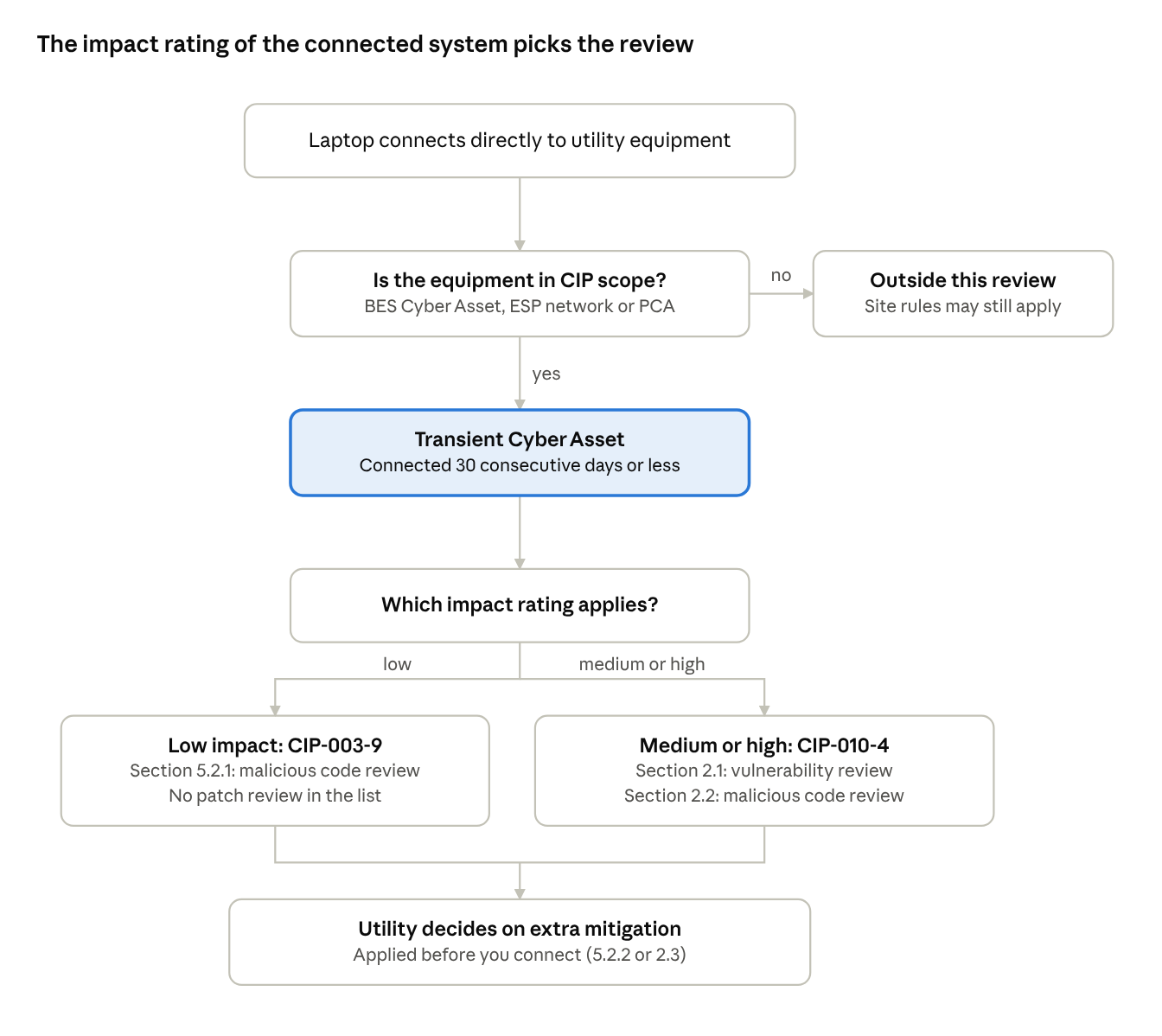
A direct connection of 30 days or less to in-scope equipment makes the laptop a Transient Cyber Asset. The impact rating of the system you connect to then decides which review applies. If you work on equipment before it goes into service, ask the utility when it starts treating that equipment as in scope.
For low impact systems, the check is about malware (CIP-003-9)
When the equipment belongs to a low impact BES Cyber System, the review covers malicious code. CIP-003-9, in effect since April 1, 2026, has the utility use one or a combination of these checks before your laptop connects (Attachment 1, Section 5.2.1):
- Your antivirus update level
- The antivirus update process you use
- Your application whitelisting (also called allowlisting)
- Use of a live operating system, with software that runs only from read-only media
- Your system hardening
- Another method that mitigates malicious code
None of these is a patch review. A utility may still ask about patching under Section 5.2.2 or its contract.
USB drives and other Removable Media have their own rule in Section 5.3. The utility must check them for malicious code using a Cyber Asset that is not part of a BES Cyber System, and must mitigate anything found before they connect.
For medium and high impact systems, vulnerabilities get reviewed too (CIP-010-4)
For medium and high impact BES Cyber Systems, the review adds software vulnerabilities, which usually means your patching. CIP-010-4 Requirement R4 covers these systems and their associated Protected Cyber Assets, and Attachment 1, Section 2 covers laptops managed by a party other than the utility.
For software vulnerabilities (Section 2.1), the utility uses one or a combination of:
- A review of your installed security patches
- A review of your security patching process
- A review of other vulnerability mitigation you perform
- Another method that mitigates software vulnerabilities
For malicious code (Section 2.2), the options match the low impact list. Under Section 2.3, the utility then decides whether more mitigation is needed and must implement it "prior to connecting the Transient Cyber Asset."
| What the utility reviews | Low impact (CIP-003-9) | Medium and high impact (CIP-010-4) |
|---|---|---|
| Malicious code protection | Yes, Section 5.2.1 | Yes, Section 2.2 |
| Security patches and vulnerability mitigation | Not listed | Yes, Section 2.1 |
| Extra mitigation the utility decides is needed | Yes, Section 5.2.2 | Yes, Section 2.3 |
| USB drives and other Removable Media | Attachment 1, Section 5.3 | Attachment 1, Section 3, which also covers who may use it and where |
The pre-arrival packet that speeds up approval
The utility can accept your own documents as evidence of its review. Attachment 2 of both standards lists memoranda, email, system documentation, policies or contracts from the other party as examples, alongside the utility's own change management records.
A short packet that maps to each review option makes the check quick:
- A written endpoint protection policy naming your antivirus or endpoint detection and response (EDR) tool and how its signatures update
- A recent report showing each laptop's signature version and last scan
- Your patching policy and a recent patch status report for each laptop (relevant for medium and high impact systems)
- Your hardening baseline, such as a Center for Internet Security (CIS) Benchmark configuration, with proof it is applied
- Your application allowlisting details, if you use it
- A list tying each laptop to the technician who carries it
- A named contact who can answer the utility's questions the same day
Keep the reports current. A scan report from last month says little about the laptop in front of the utility today, and if your laptops spend weeks offline, our guide to patching field laptops that can't stay connected shows how to keep them current. Before the job starts, ask the utility for its written requirements for vendor laptops and removable media, so you can prepare for its process.
Want a second set of eyes on your packet before the next site visit? Reach us at [email protected] and we'll review it with you.
Three assumptions the NERC CIP text doesn't support
- That a specific product is required. The standards list review methods, such as antivirus update level or system hardening. They name no vendor or tool.
- That the laptop review requires full-disk encryption. CIP-010-4 lists "Full-disk encryption with authentication" only for laptops the utility manages itself (Attachment 1, Section 1.5). It is not among the review options for your laptop, and CIP-003-9 Section 5 does not list it. A utility may still require it, for example to protect BES Cyber System Information. CIP-011-3 lists encryption as an example method for that at medium and high impact systems.
- That the listed checks are a ceiling. Each utility can require more before you connect (CIP-003-9 Section 5.2.2, CIP-010-4 Section 2.3), and contracts can add terms of their own.
What changes in 2028 and 2029, and why to start now
The versions above stay in force until mid-2028, unless a utility adopts the new ones early. Two orders from the Federal Energy Regulatory Commission (FERC), both effective May 26, 2026, set what comes next.
- FERC Order No. 919 approved 11 updated CIP standards for virtualization, including CIP-010-5 and CIP-003-10, plus revised definitions. The new Transient Cyber Asset definition adds Virtual Cyber Assets and connections to Shared Cyber Infrastructure. It also treats virtual machines on a laptop as software on that laptop. The NERC Glossary lists it as effective July 1, 2028.
- FERC Order No. 918 approved CIP-003-11, which supersedes CIP-003-10. It adds controls for low impact systems with external routable connectivity: remote user authentication, protection of authentication data in transit, and detection of malicious communications. The order does not mention Transient Cyber Assets. Under NERC's implementation plan, CIP-003-11 takes effect at the start of the first calendar quarter 36 months after the order took effect. That is July 1, 2029.
If your laptops run virtual machines or connect to virtualized utility systems, review the new definition before 2028. If your people connect remotely to utility sites with low impact systems, CIP-003-11 matters to you, since it adds authentication for remote users.
Those dates can sound far off. Utilities may adopt the virtualization versions early, though, and contracts can require changes before any deadline. Ask the utilities you work with when they plan to switch.
How CyberBlip prepares contractors for utility reviews
CyberBlip supports contractors whose people connect to utility equipment. We map your laptops' protections to the review options above, keep endpoint protection and patching current on a set schedule, and assemble the evidence packet utilities ask for. Our compliance programs include NERC CIP.
If a utility has sent you a laptop questionnaire or a site requirement you are unsure about, we will walk through it with you. Request a free assessment, or reach us at [email protected] or 954-469-6970.
NERC CIP for contractors: frequently asked questions
What is a Transient Cyber Asset in NERC CIP?
A Transient Cyber Asset is a Cyber Asset, such as a laptop, that can transmit or transfer executable code, is not part of a BES Cyber System or a Protected Cyber Asset tied to high or medium impact systems, and connects directly to a BES Cyber Asset or other in-scope utility equipment for 30 consecutive calendar days or less. The definition is in the NERC Glossary and has been in effect since January 1, 2020.
Does NERC CIP apply to contractors?
Not directly. It applies to the utility or other registered entity. It reaches you because the utility must review your laptop before it connects, and because contracts can pass requirements on to you.
Is my laptop a Transient Cyber Asset if it has no internet connection?
It can be. The definition looks at a direct connection of 30 consecutive calendar days or less to in-scope utility equipment, such as a BES Cyber Asset. Internet access plays no part.
What will the utility ask to see before I connect?
Evidence of how your laptop is protected against malicious code, such as antivirus update levels, application allowlisting or system hardening. For medium and high impact systems, expect a review of your patches or patching process too. Memoranda, email, system documentation, policies or contracts from you can serve as that evidence.
Do I need full-disk encryption on my laptop for NERC CIP?
The laptop review does not require it. CIP-010-4 lists it only for laptops the utility manages itself. A utility may still ask for it, for example to protect BES Cyber System Information.
Where NERC CIP stops: equipment before it reaches the site
Everything above happens at the moment of connection. The standards say far less about the equipment itself before it reaches a utility site: where it was built, who configured it, and on which laptop. That gap is the subject of Part 2.
This article summarizes the standards for planning and is not legal advice. Each utility's procedures and contracts govern what applies on its sites.
About CyberBlip
CyberBlip provides IT, cybersecurity and compliance support to organizations without mature internal IT teams, such as engineering firms, with a particular focus on critical infrastructure, including electric utilities.
Sources
All pages accessed November 10, 2026.
- NERC, Reliability Standard CIP-003-9 (PDF): Requirement R2, Attachment 1 Section 5, Attachment 2
- NERC, Reliability Standard CIP-010-4 (PDF): Requirement R4, Attachment 1 Sections 1 to 3, Attachment 2
- NERC, Reliability Standard CIP-011-3 (PDF): Requirement R1, Part 1.2
- NERC, Glossary of Terms Used in NERC Reliability Standards: Transient Cyber Asset, BES Cyber Asset, Removable Media
- NERC, CIP-003-11 Implementation Plan, November 2024 (PDF): CIP-003-9 and CIP-003-11 effective dates
- FERC, Order No. 918, Docket RM25-8-000, Federal Register, March 24, 2026
- FERC, Order No. 919, Docket RM24-8-000, Federal Register, March 24, 2026 (PDF)